Space Waves
Navigate the Neon Void in Space Waves
Space Waves is a high-octane arcade game where you guide a nimble arrow through a gauntlet of lethal obstacles to reach the finish line. In Space Waves, every movement matters.
A Test of Precision and Reflexes
In this vibrant 2D side-scroller, your survival in Space Waves depends entirely on your timing and rhythm. With 33 distinct levels available right from the start in Space Waves, you have the freedom to choose your own path, whether you want to ease in with simpler "green" challenges or dive straight into the most punishing trials of Space Waves. Each stage is clearly labeled by difficulty, allowing you to gauge the intensity of the rotating cogs, sharp thorns, and tight corridors that lie ahead in Space Waves.
Whether you are playing Space Waves on a desktop or a mobile device, the one-button mechanics make the game easy to pick up but incredibly difficult to master. As the speed picks up and the gaps narrow, Space Waves transforms into a true test of skill, requiring players to maintain focus and perfect their zigzagging trajectory to avoid a catastrophic crash. Prepare for a journey through neon-soaked environments where every millisecond counts in Space Waves.
How to Play Space Waves
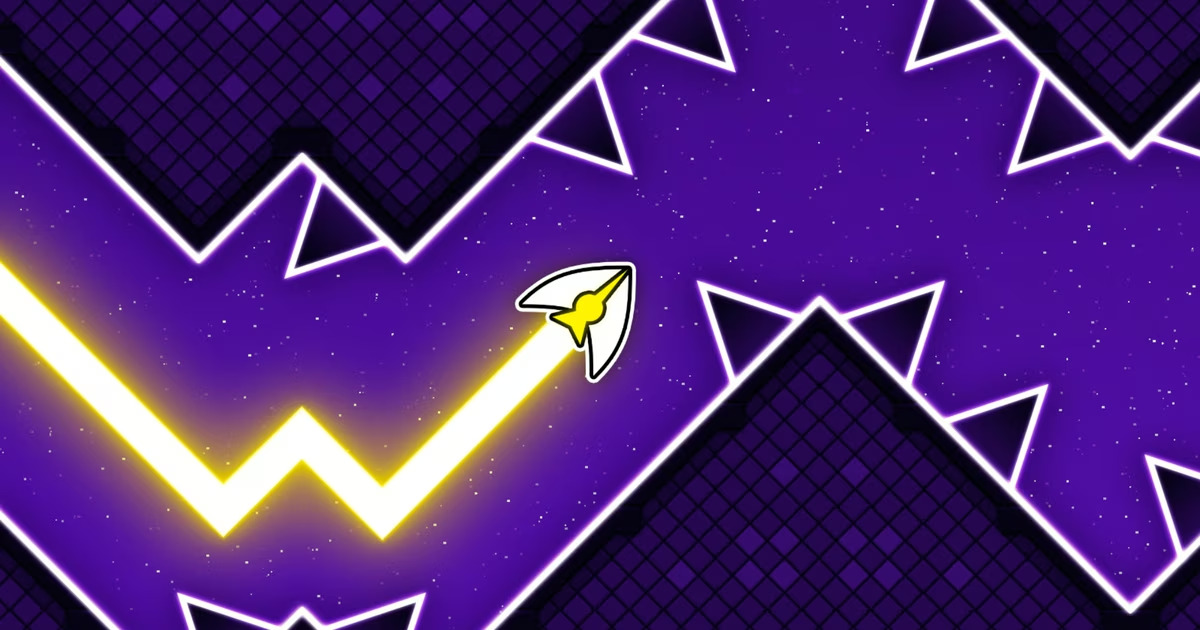
Space Waves is a high-octane arcade game that tests your reflexes, timing, and patience. While the premise of Space Waves is simple—navigate a neon arrow through a treacherous gauntlet to reach the finish line—the execution in Space Waves requires precision and a deep understanding of momentum-based movement.
The Core Objective
The goal in each of the 33 available levels of Space Waves is to guide your arrow from the starting point to the end portal. The path in Space Waves is littered with deadly hazards, including jagged walls, rotating cogs, and sharp thorns. A single collision with any surface or obstacle in Space Waves results in an instant "Game Over," forcing you to restart the Space Waves level from the very beginning.
Master the Controls
Space Waves utilizes "one-button" mechanics, making it accessible but difficult to master. The movement in Space Waves is dictated by a constant zigzag pattern:
- Ascending: On a PC, hold the Left Mouse Button, W, or the Spacebar to make your Space Waves arrow climb upward. On mobile devices, simply press and hold the screen while playing Space Waves.
- Descending: To move downward in Space Waves, release the button or your finger. The Space Waves arrow will immediately begin to dive toward the bottom of the screen.
- Pausing: If you need a moment to breathe while playing Space Waves, press P to pause the game (PC only).
Navigating Difficulty Levels
One of the unique features of Space Waves is the freedom to choose your path. You are not required to complete Space Waves levels in linear order. Each stage in Space Waves is labeled with a colored face icon that indicates its difficulty:
- Green Levels: These are beginner-friendly Space Waves stages, featuring wider corridors and fewer obstacles, allowing you to build rhythm.
- Harder Levels: As the difficulty increases in Space Waves, the spaces become tighter and the obstacles move faster. You will encounter sharp "V" shaped tunnels in Space Waves that require rapid-fire clicking to maintain a steady horizontal trajectory.
Success in Space Waves depends on your ability to predict the arrow's momentum. By mastering the timing of your clicks in Space Waves, you can create a "zigzag" flow that allows you to slip through even the narrowest gaps.
Tips & Strategies for Space Waves
Mastering the neon-soaked corridors of Space Waves requires a blend of rhythm, precision, and quick thinking. Whether you are tackling a "Green" entry-level stage or a "Demon" difficulty challenge in Space Waves, these strategies will help you navigate the hazards with ease.
- Master the Zigzag Technique: To maintain a relatively straight trajectory through narrow corridors in Space Waves, rapidly click or tap to create a tight zigzag pattern. This prevents your Space Waves arrow from gaining too much vertical momentum.
- Study the Difficulty Icons: Use the color-coded faces on the Space Waves level select screen to your advantage. If you are a Space Waves beginner, start with the green faces to learn the physics of the arrow. Save the red and purple "Demon" levels for when you have mastered the Space Waves sensitivity.
- Anticipate the Momentum: The arrow in Space Waves doesn't stop instantly when you release the button. It follows a physics-based arc in Space Waves. Learn to release your click slightly before you reach the peak of a gap to ensure you don't over-drift into a ceiling spike in Space Waves.
- Use Visual Cues for Timing: Many Space Waves obstacles, like rotating cogs and moving thorns, follow a set mechanical rhythm. Instead of looking directly at your arrow, try to focus on the space just ahead of it in Space Waves. This allows you to time your "climbs" and "drops" based on the movement of upcoming Space Waves hazards.
- Practice Short Bursts: In Space Waves levels with tight angles, avoid holding the button down for long periods. Short, controlled taps in Space Waves provide much better maneuverability and make it easier to recover if you find yourself approaching a wall too quickly.
- Don't Fear the Restart: Since Space Waves allows you to jump into any of the 33 levels at any time, use the harder levels as a "training ground." Spending a few minutes in a high-difficulty Space Waves stage can sharpen your reaction times, making the easier Space Waves levels feel much more manageable by comparison.
- Keep a Light Touch: Especially on mobile devices or high-DPI mice, the Space Waves arrow can be very sensitive. Maintain a relaxed grip on your Space Waves controls to avoid "panic clicking," which is the most common cause of crashing into a rotating cog in Space Waves.
FAQ about Space Waves
How many levels are there in Space Waves?
Space Waves features 33 unique levels. One of the best features of Space Waves is that all levels are unlocked from the start, allowing you to jump into any challenge immediately without having to progress through Space Waves linearly.
How do I know which levels are the hardest in Space Waves?
The Space Waves game uses a visual difficulty system represented by colored faces. "Green" levels in Space Waves indicate a more beginner-friendly experience with wider spaces, while the more intense colors signify expert-level Space Waves challenges filled with tight angles and complex obstacles.
Can I play Space Waves on my phone?
Yes! Space Waves is fully optimized for mobile web browsers. Instead of using a keyboard or mouse for Space Waves, you simply hold your finger on the screen to make the arrow climb and release it to let the arrow descend.
What happens if I hit an obstacle in Space Waves?
If your arrow in Space Waves makes contact with a wall, a rotating cog, or a thorn, the level will immediately end. You will need to restart the Space Waves level from the beginning, making it a game that rewards precision, rhythm, and quick reaction times.
What is the best strategy for navigating tight spaces in Space Waves?
The most effective strategy for Space Waves is mastering the "zigzag" motion. By clicking or tapping in a consistent rhythm while playing Space Waves, you can maintain a relatively straight trajectory. This momentum is essential for passing through narrow Space Waves corridors where sudden, sharp movements would result in a crash.
Next Adventures
Infinite Craft
Infinite Craft

Capybara Clicker
Capybara Clicker
Space Waves
Space Waves
Survive Lava for Brainrots!
Survive Lava for Brainrots!
Block Blast
Block Blast
Speed Stars
Speed Stars

TB World
TB World

Planet Clicker
Planet Clicker
Merge Royal
Merge Royal
Gas Station
Gas Station

Happy Wheels
Happy Wheels
Crossword
Crossword

Wall Wars
Wall Wars
Knife Master
Knife Master
Baseball
Baseball
Block Breaker
Block Breaker

Poppy Playtime
Poppy Playtime
Clash Royale
Clash Royale

Slice Master
Slice Master
13 Bones
13 Bones